A new version of the Distributor
Porfolio was released today. This
version adds the Manufacturers tab to the Distributor Profile (see below).
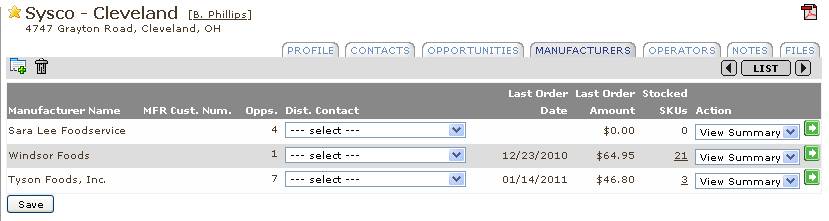
From this tab, the customer manager
can assign a distributor contact for the manufacturer or see a Distributor /
Manufacturer Summary Sheet or Stocking Sheet.
The choice for generating the stocking sheet is only available when we
have order history. Also some of the
sections in the D/M Summary will be blank in the absence of order history.
There are currently(examples
attached).


The Manufacturers tab lists the Manufacturers
that are handled by the Distributor.
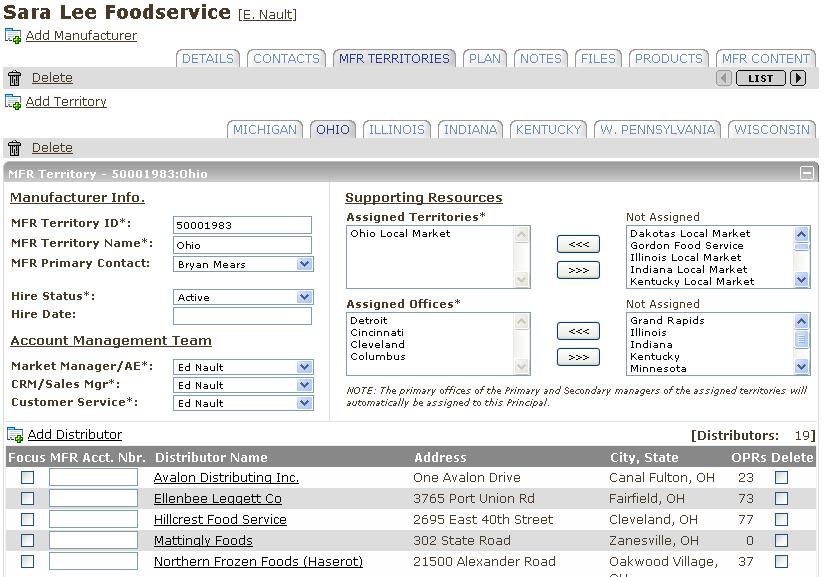
This list is driven by the list of Distributors for that in the
Manufacturer Porfolio (see below). A
distributor will show up in this list when it is added to the Distributor
section of a MFR Territory in the Manufacturer portfolio. Distributors are also automatically added to
the a MFR Territory based on the existence of distributor sales data for the
MFR skus. The auto addition of
distributors will only take place when the Distributors sales territory has
been added as an assigned resource to one MFR territory.