RE: Lookup Manager - Add Reassign feature to No Sale Reasons (SCRUM Id: 1973)
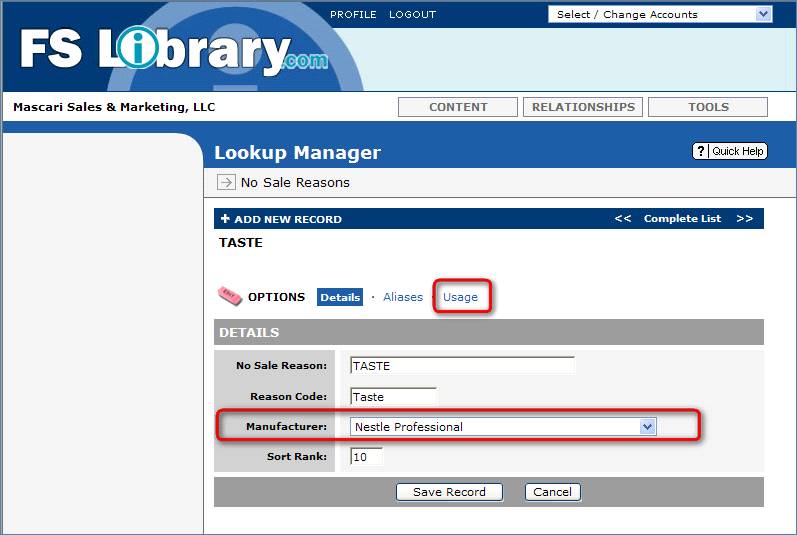
Changes have been made to No Sale
Reasons Lookup Manager Tool. It is now
possible to associate a No Sale Reason with a specific Mfr. Once this is done, any Mfr specific Opportunity
or Sales Call will only display No Sale Reasons from the list of Mfr specific
reasons. If No Mfr specific reasons are
setup, then the list of generic reasons will display. In general, you should only set up Mfr specific reasons, if a Mfr requires them (e.g., Nestle).
There is also a new Usage
Link. This page will show a count of
how many Sales Calls and/or Opportunities are linked to the current
reason. You will only be able to delete
the reason, if the combined link count is zero. There is now also a Reassign Feature on this page. Click the Reassign checkbox to view the list
of possible values to reassign to.
Note, if the current Reason is Mfr specific, you will only be able to
reassign to other Mfr specific reasons of the same Mfr. Clicking the Reassign button will change all
the Sales Calls and Opportunities links so that there are now aligned with the
chosen value.
Note, this operation is not
revisable and should be used with caution.
Only Reasons that are not linked
to any Calls or Opportunities can be deleted from the system.