I have made some significant changes
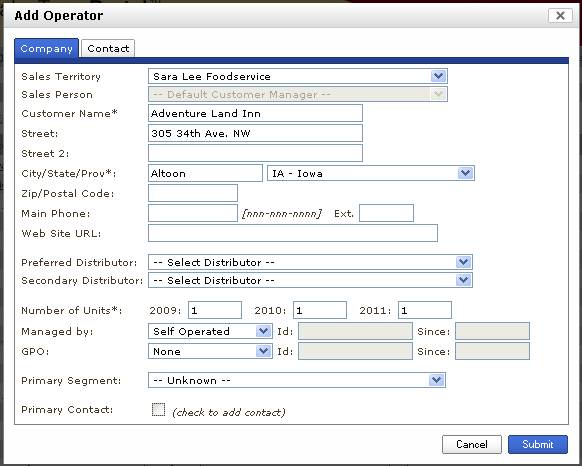
to the Add Operator Dialog box. It now
is split across two tabs, this was done to create more room for fields that
have been requested and also to support duplicate operator checking.
This changes is live for all
Manufacturer and Broker clients that have Operator Portfolio.
Here are some notes on the changes:
·
New
Fields Add: The new fields that have been added are the Number of Units and the
Contract Management / GPO fields. Note
that the CMC fields will not appear if the client doesn't have any configured.
When the user attempts to add an
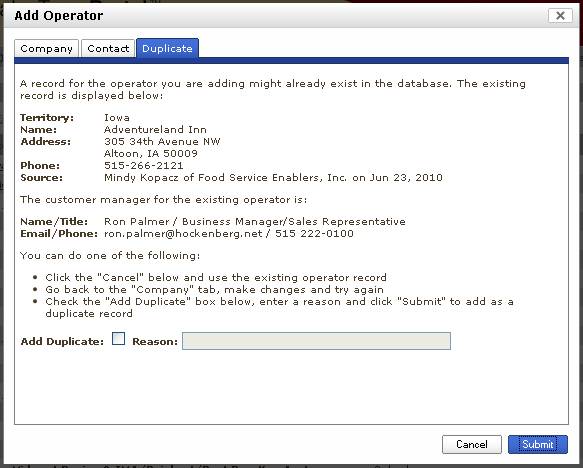
operator that might already be in the system, the system adds a
"Duplicate" tab like the one below.
·
When
this happens, the user must decide to cancel the add, make changes to the
company information and try again, or force it in anyway. If they force it in (by checking Add
Duplicate), they must provide a reason for adding it.
The
algorithm checks for dups within the users territory span of visibility. If a senior level user that has visibility
into all territories attempts to add, the entire operator portfolio will be
checked. If a user with visibility to
only one market attempts to add, only the markets that user has visibility to
will be searched.
The goal
of this change is help them keep their data clean while still allowing for an
efficient workflow. This will not catch
all duplicates, nor will it prevent them from adding them.